Lovoro: from tender to construction, from manufacturing to dispatch
A platform for Construction and Steel Construction: organise bids, coordinate projects and track production, connecting information, people and decisions throughout each project.
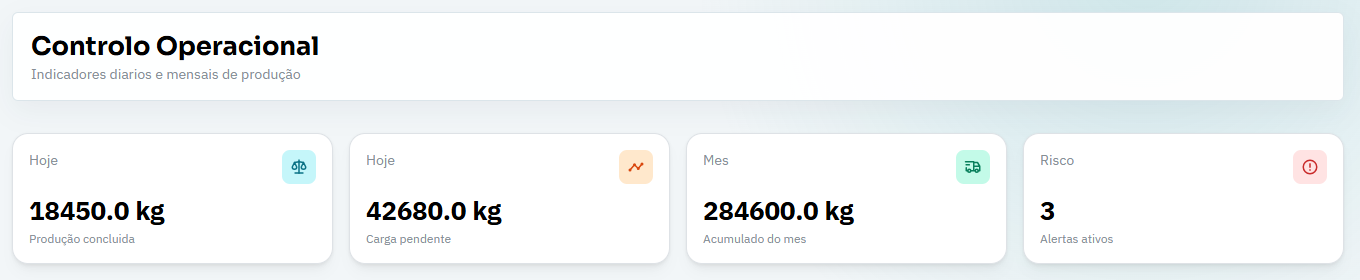
Lovoro operational dashboard. Actual Portuguese interface with demonstration data.
Product in development. This map covers features present in Lovoro's development version. Please confirm availability and access conditions with the team.
16 functional areas
01 · Prepare
Tenders, estimates and bids
Structure the work and costs before moving into execution.
Tenders and estimates
Register tenders, organisations and tracking statuses.
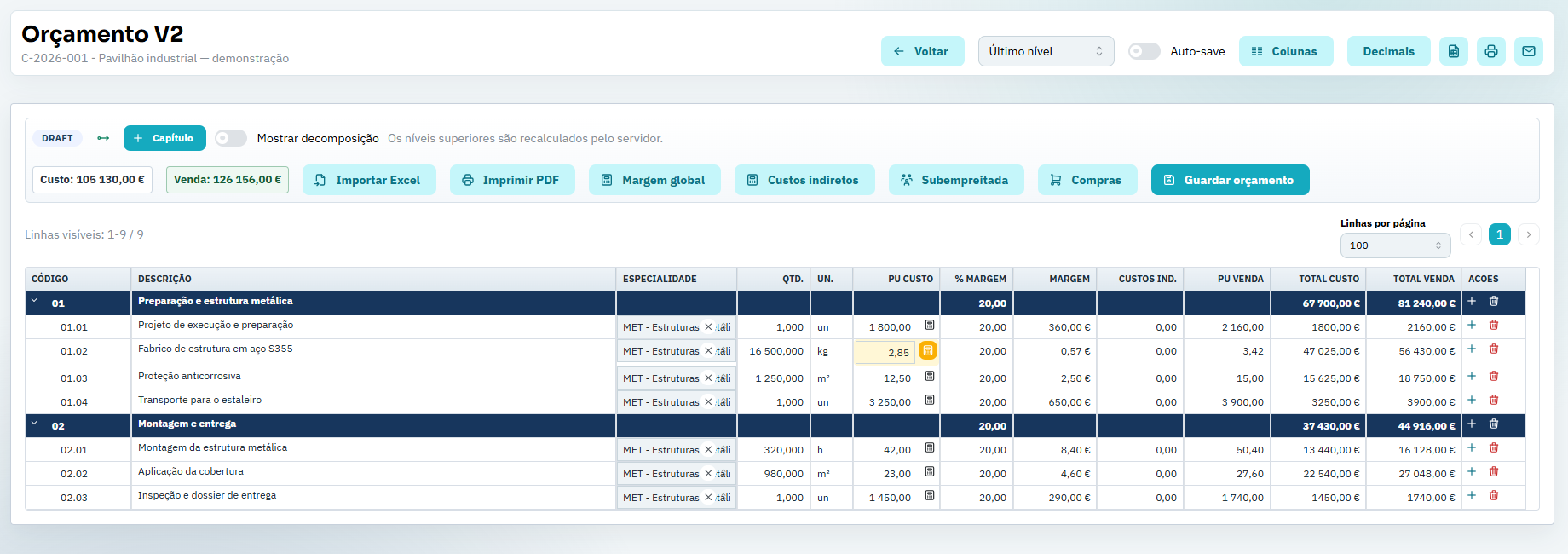
Estimate versions with sections, items, quantities and prices.
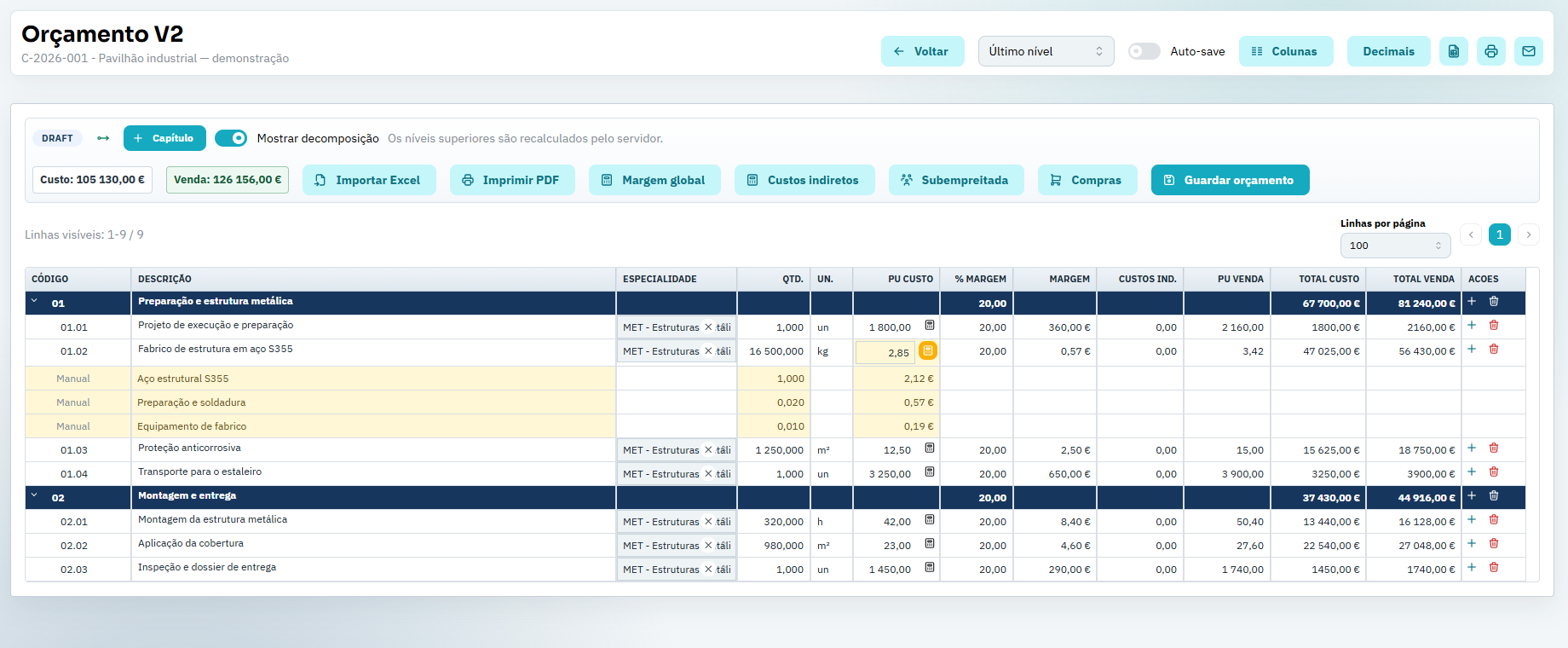
Price breakdowns using resources and estimating templates.
Margins, adjustments, indirect costs and decimal-place settings.
Import estimates from Excel and convert a tender into a construction project.
Detailed estimate: sections and items with quantities, costs, margins and sale values. Portuguese interface with demonstration data.Cost breakdown: the manufacturing item is detailed into steel, preparation work and equipment. Portuguese interface with demonstration data.
Gantt scheduling
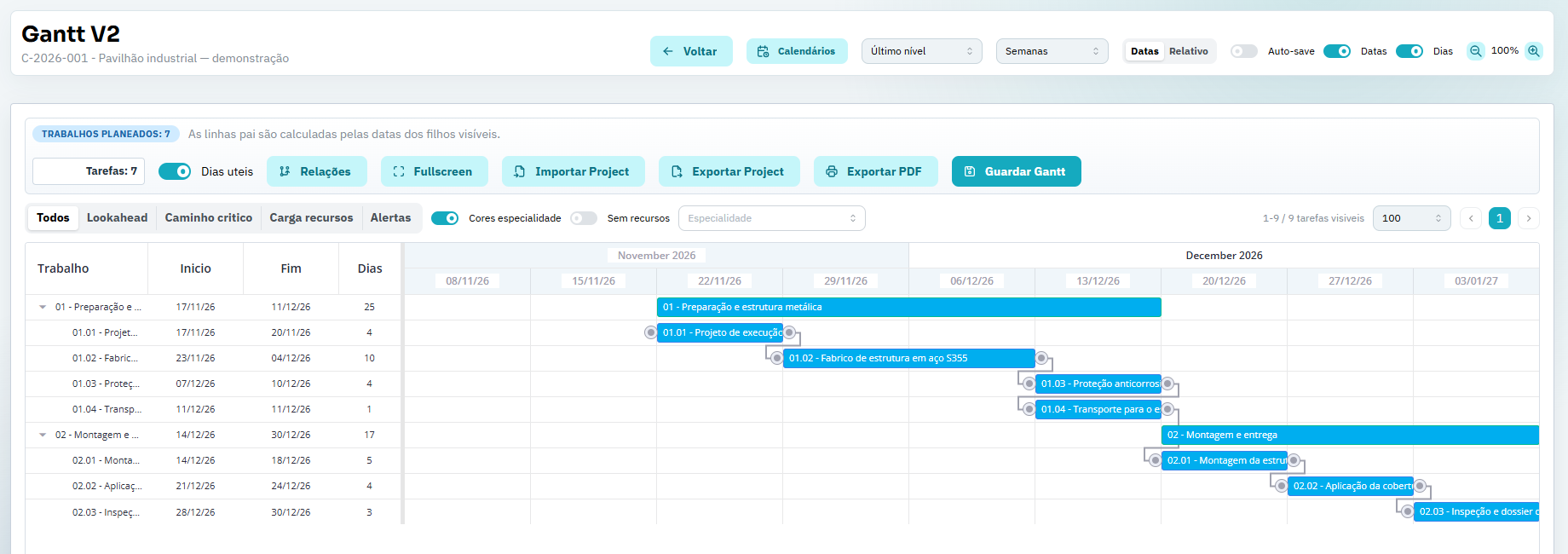
Tasks linked to estimate lines, with dates and durations.
Activity dependencies and working calendars.
Allocate labour and equipment to tasks.
Views by period, trade and resource load.
Import Microsoft Project files and export project XML.
Gantt schedule: preparation, manufacturing, protective treatment, transport and assembly linked by dependencies. Portuguese interface with demonstration data.
Subcontracting and purchasing
Requests for quotation based on estimate lines.
Select subcontractors and suppliers to invite.
Record prices, quoted quantities and notes for each organisation.
Item-by-item comparisons and totals for each quotation.
Track request statuses and received responses.
02 · Coordinate
Construction and resource management
Connect estimates with changes, progress measurements and teams.
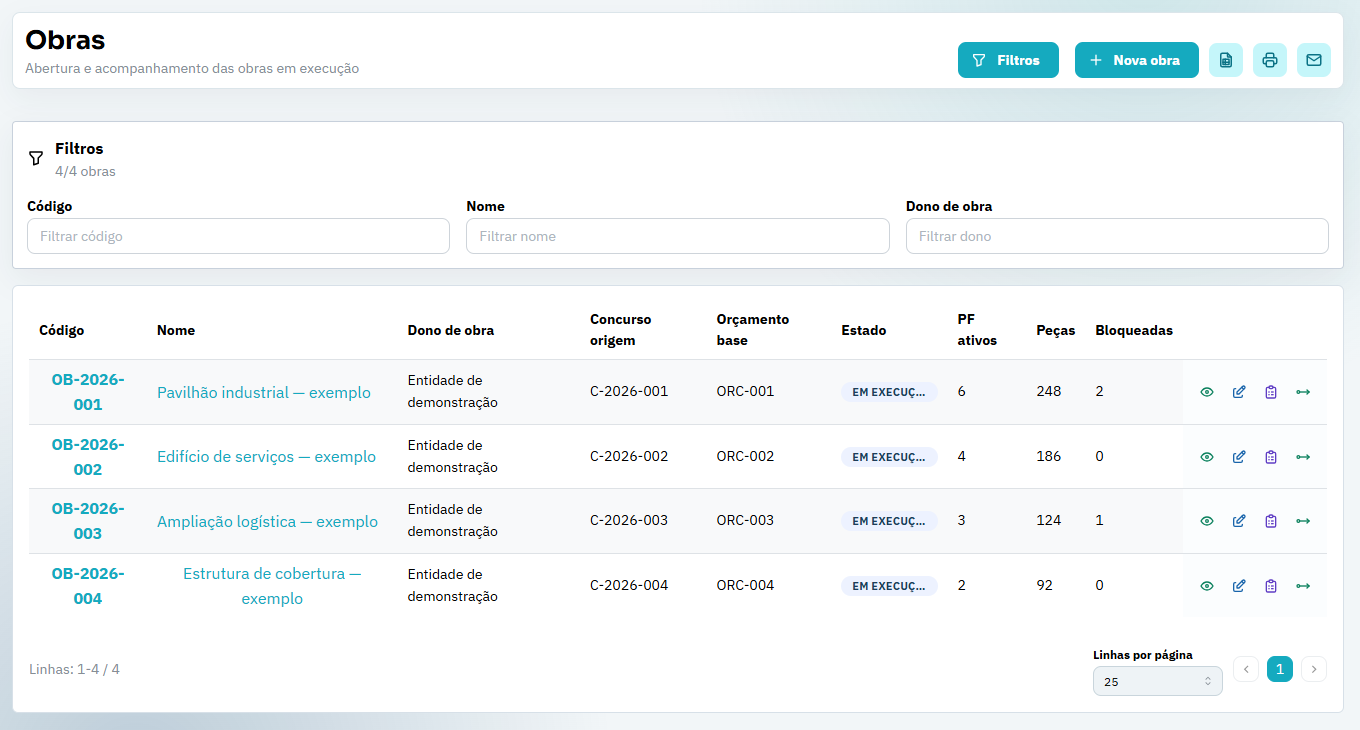
Projects, statuses and linked plans. Portuguese interface with demonstration data.
Construction projects and project dossier
Create and edit projects, owners, organisations and statuses.
Main estimate linked to the construction project.
View subcontracts, purchases and additional contracts in the dossier.
Access Gantt schedules, change requests and progress valuations within the project.
Change requests
Record project changes and their individual lines.
Identification, description and status tracking.
Editing and transitions governed by the record's status.
Progress valuations
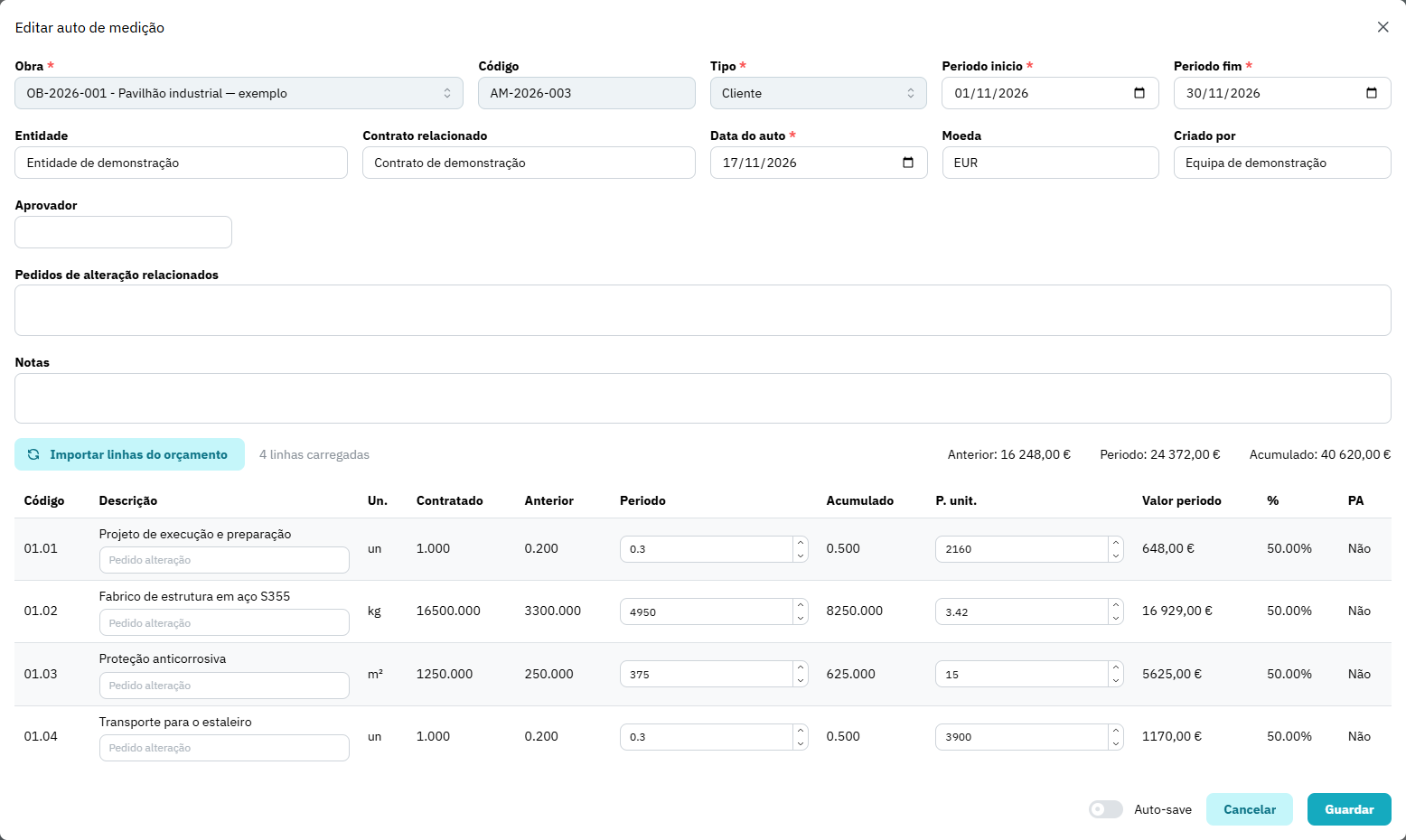
Client, subcontractor and internal progress valuations.
Measurement periods and lines linked to the project estimate.
Previous, cumulative and remaining quantities.
Measured values, statuses and editing-lock rules.
Progress valuation: current-period quantities and values compared with contracted and cumulative amounts. Portuguese interface with demonstration data.
People, teams and equipment
Employees, categories, trades and certifications.
Build teams and assign team leaders.
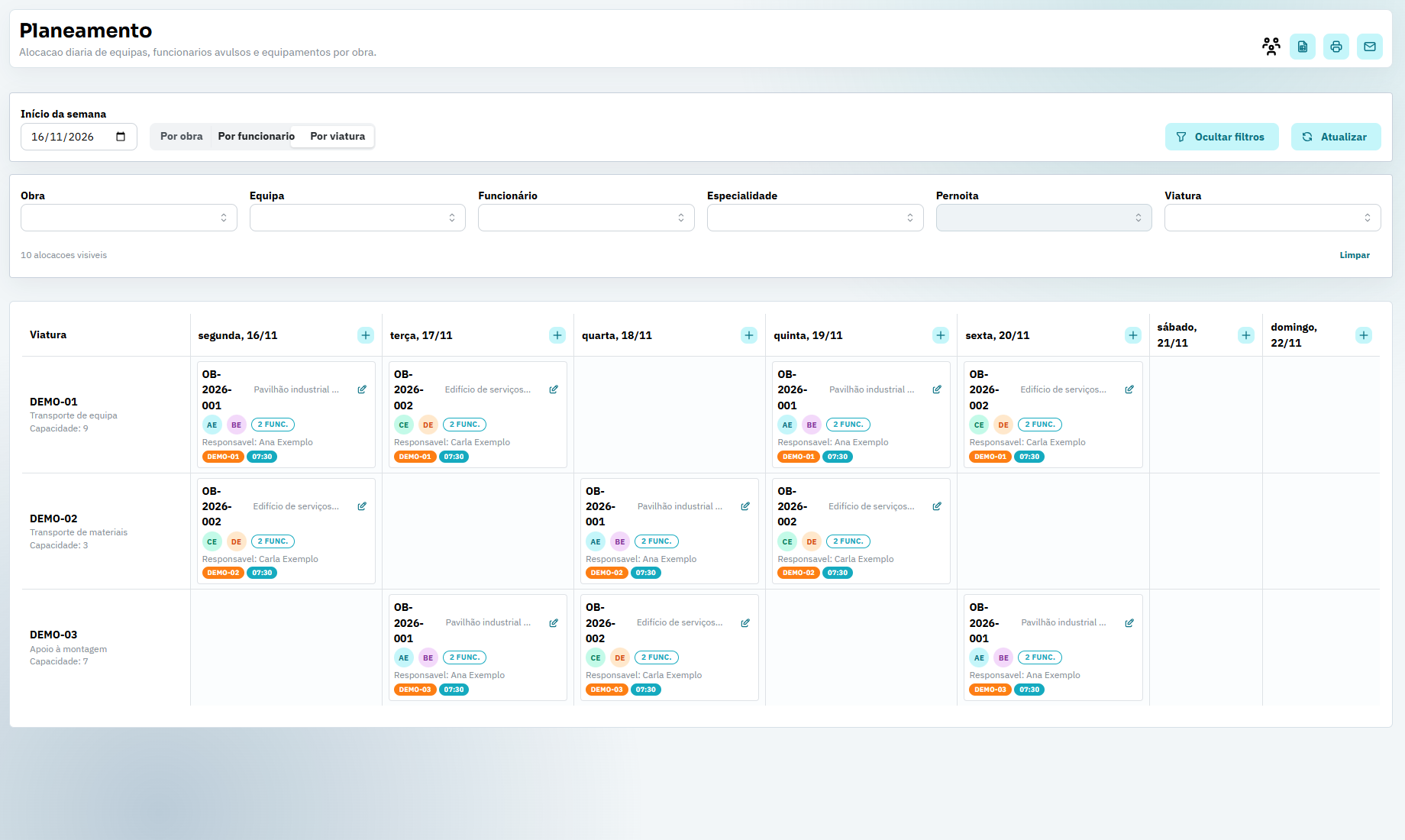
Register vehicles, equipment groups and types.
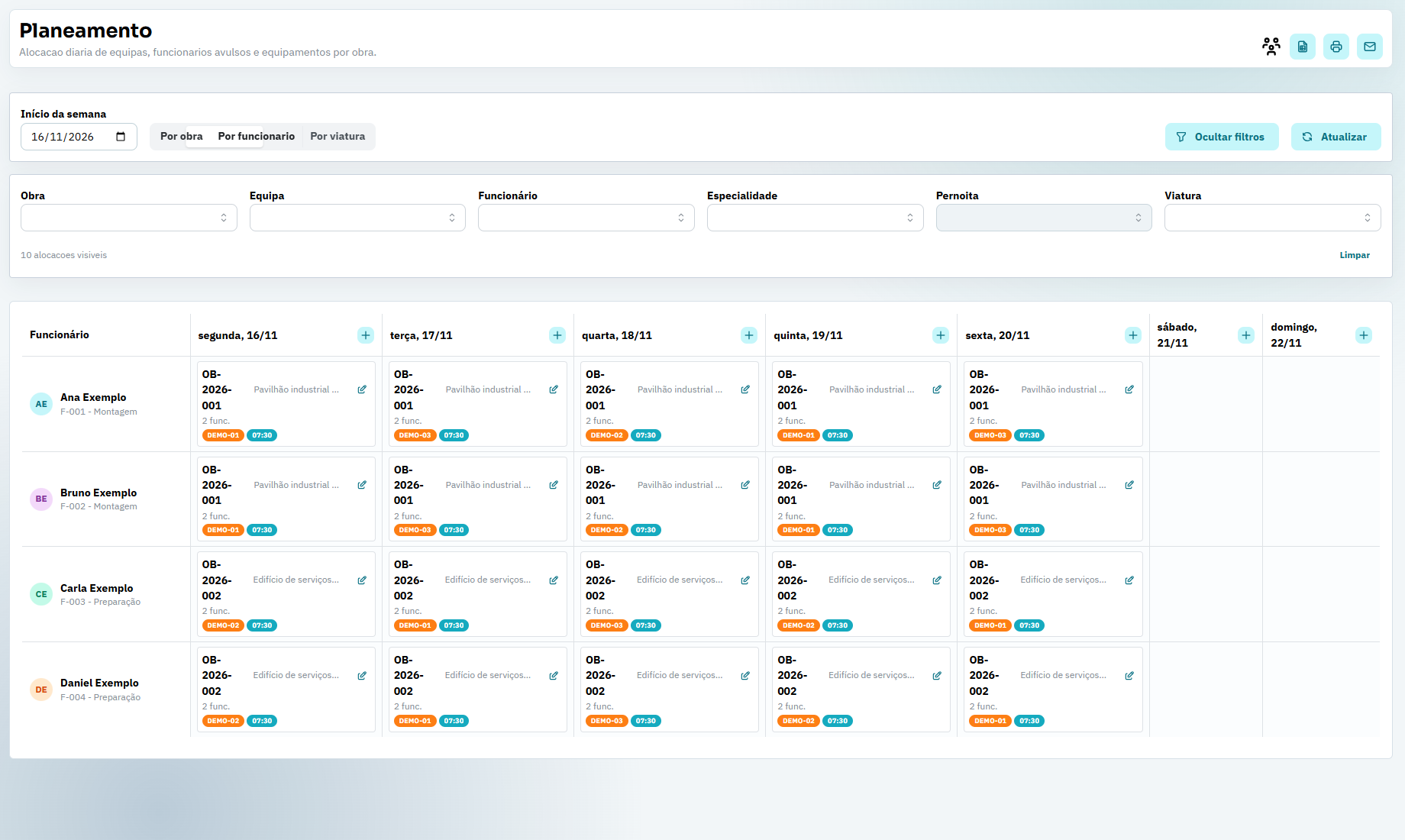
Check availability and allocate resources to projects.
People scheduling: daily project assignments with teams, departure times and vehicles. Portuguese interface with demonstration data.Vehicle scheduling: weekly allocation of transport and resources to projects. Portuguese interface with demonstration data.
03 · Produce
Preparation, manufacturing and traceability
Track parts and assemblies from preparation through factory operations.
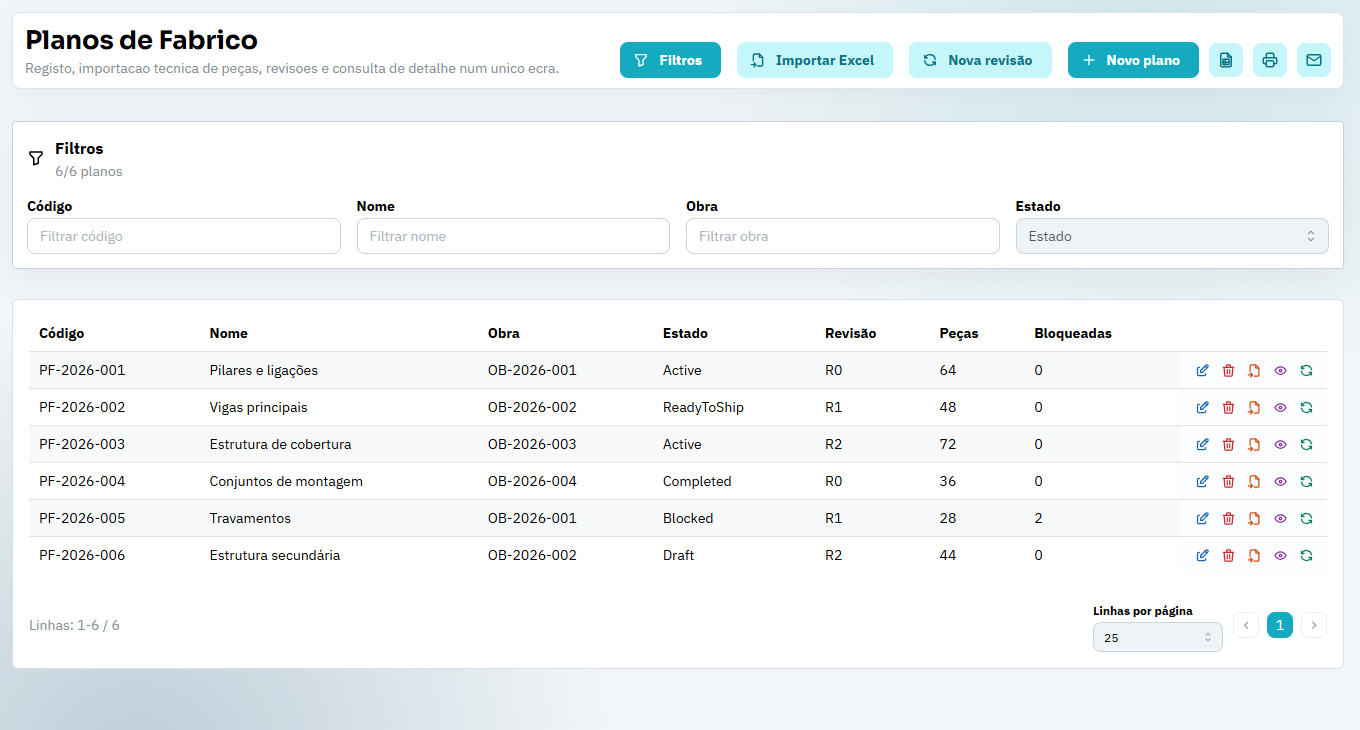
Production plans, revisions and parts. Portuguese interface with demonstration data.
Production plans and BIM
Production plans linked to projects, with revisions and planned delivery dates.
Import parts and assemblies using configurable Excel columns.
Assign operations, sequences and subcontracted work.
Create revisions and link parts to projects.
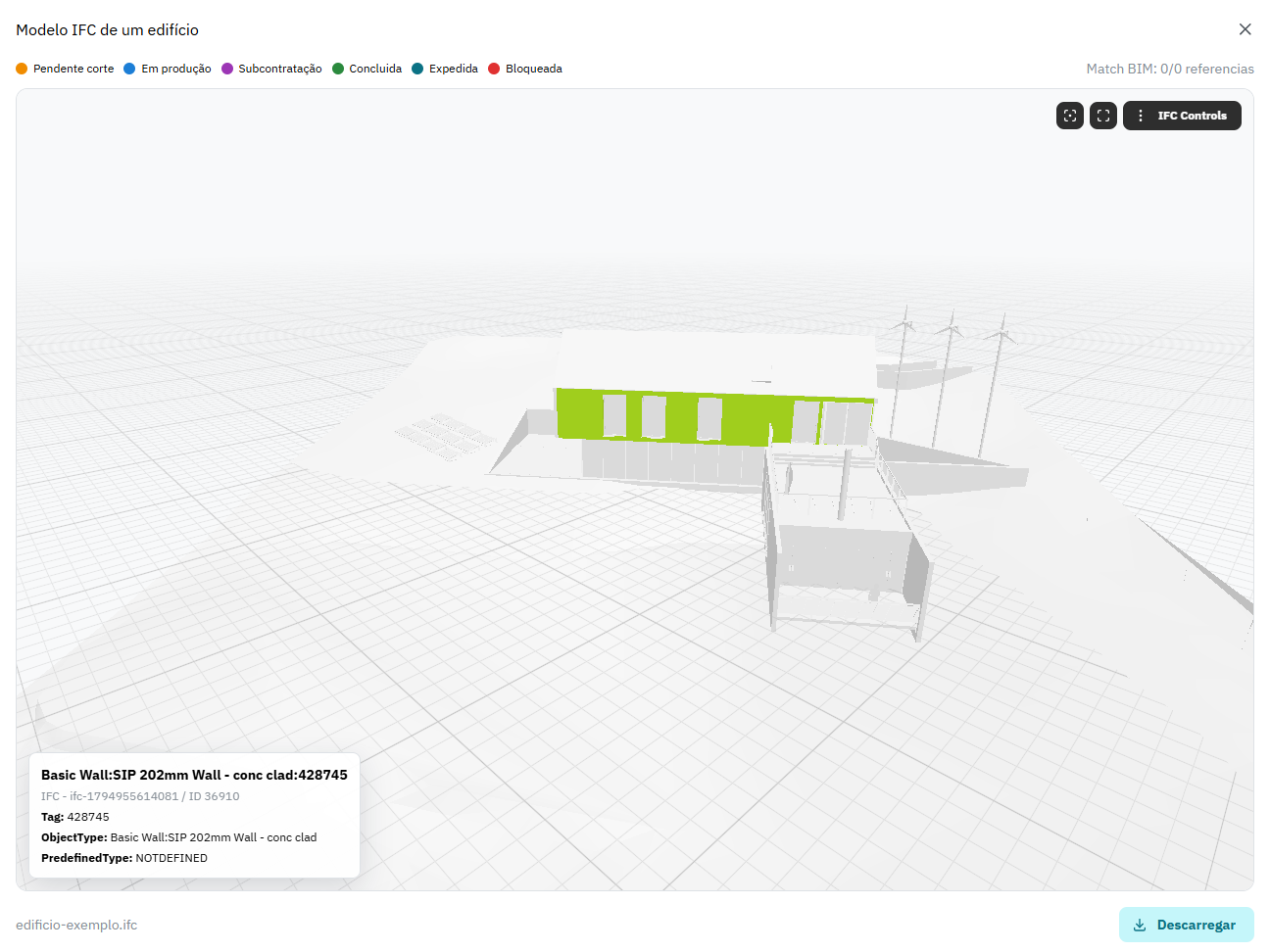
Upload and view BIM models, including IFC and supported 3D formats.
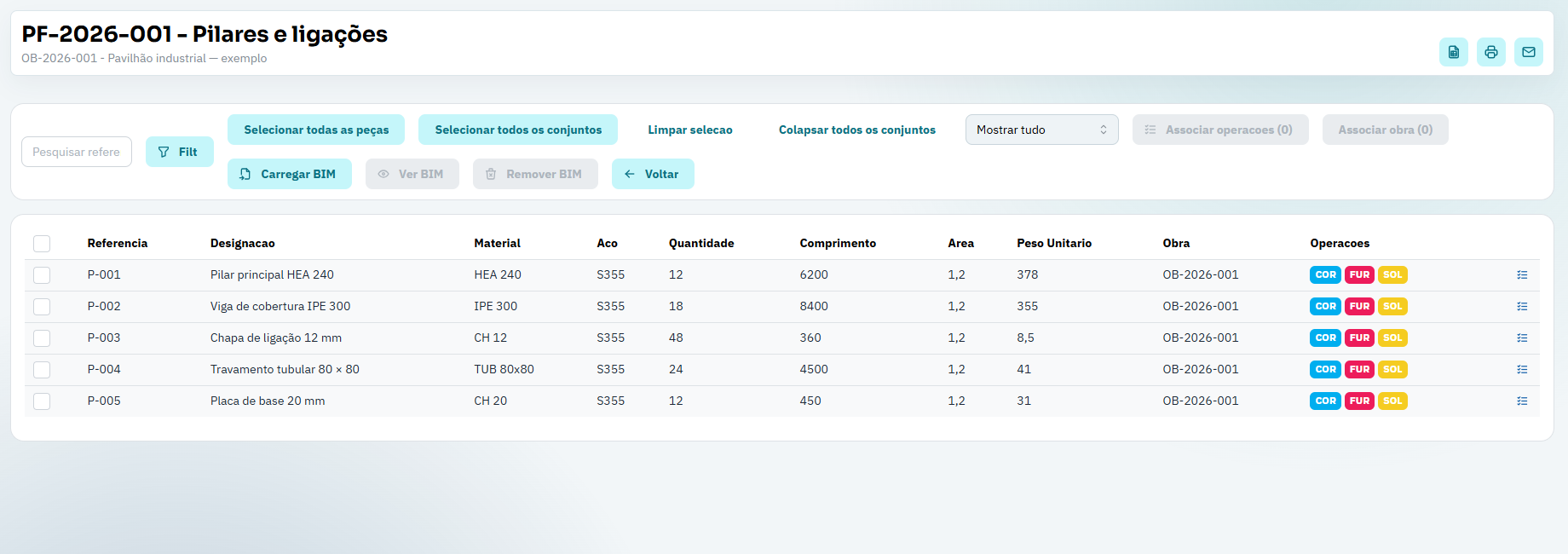
Manufacturing detail: each part brings together material, dimensions, quantity, project and operation sequence. Portuguese interface with demonstration data.IFC attachment opened in Lovoro: exploring a 3D building and viewing an element's properties. Actual Portuguese interface with a sample model.
Cutting plans
Create and edit cutting plans for profiles and plates.
Import material and part lines.
Identify batches, quantities, lengths and remnants.
Link to projects, production plans and work centres.
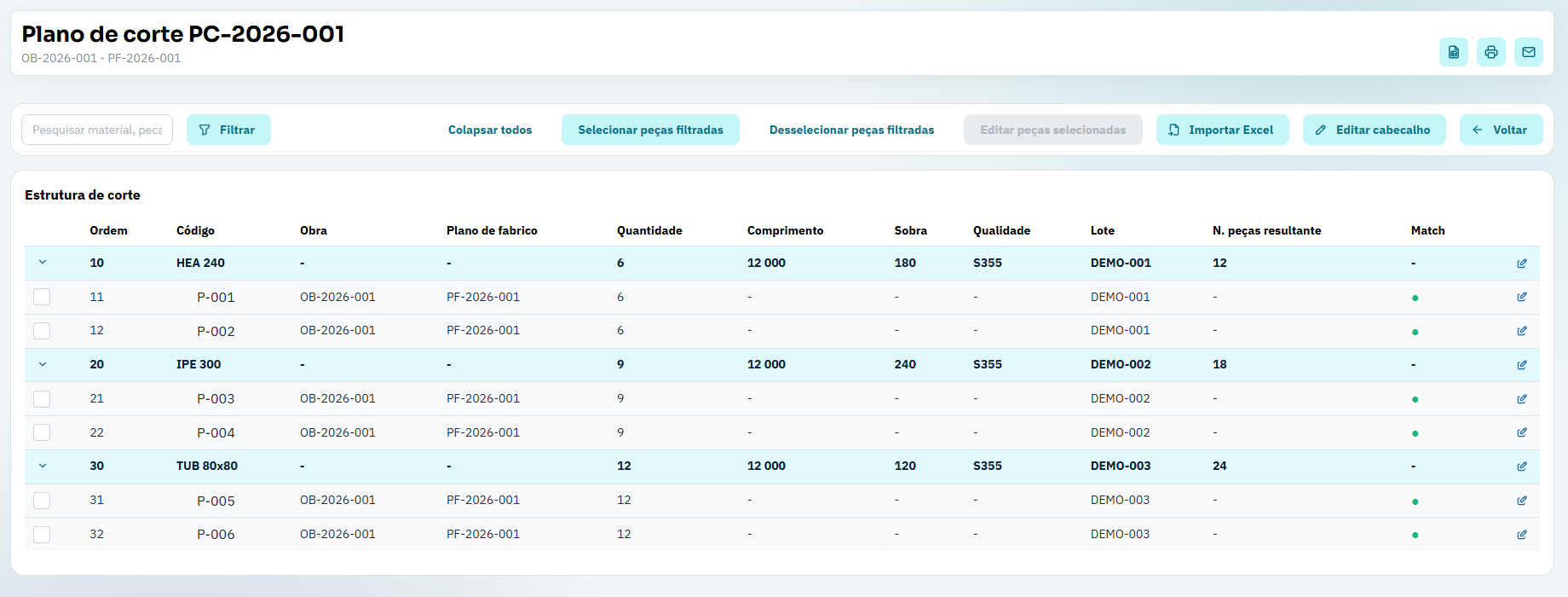
Cutting plan: materials and parts linked to the project and manufacturing plan, including quantities, lengths, remnants and batches. Portuguese interface with demonstration data.
Shop floor
Scan part and assembly references and QR codes.
Record operation execution and confirm cut parts.
Record blocks, reasons and responsible people.
Release blocks and track active blocks.
04 · Deliver
Logistics and dispatch
Link outgoing materials to the project and production plan.
Dispatches, receipts and balances
Create dispatches with origin, destination, project and plan.
Add parts by scanning references, with quantities and weights.
Close dispatches and record receipts.
View production-plan balances in the logistics module.
05 · Connect and monitor
Information, collaboration and control
Shared services across Lovoro's functional areas.
Metrics and alerts
Daily and monthly production metrics, pending weights and blocked parts.
Identify prolonged blocks and upcoming deliveries still to be completed.
Track open dispatches and operational alerts.
Documents and approvals
Upload and view documents by category and associated record.
Submit, approve and reject documents through document workflows.
Approval notifications and decisions.
Define workflows, steps and statuses for supported processes.
Forms and information collection
Configurable form definitions and categories.
Generate links for external respondents.
View submitted responses.
Approve or reject submissions.
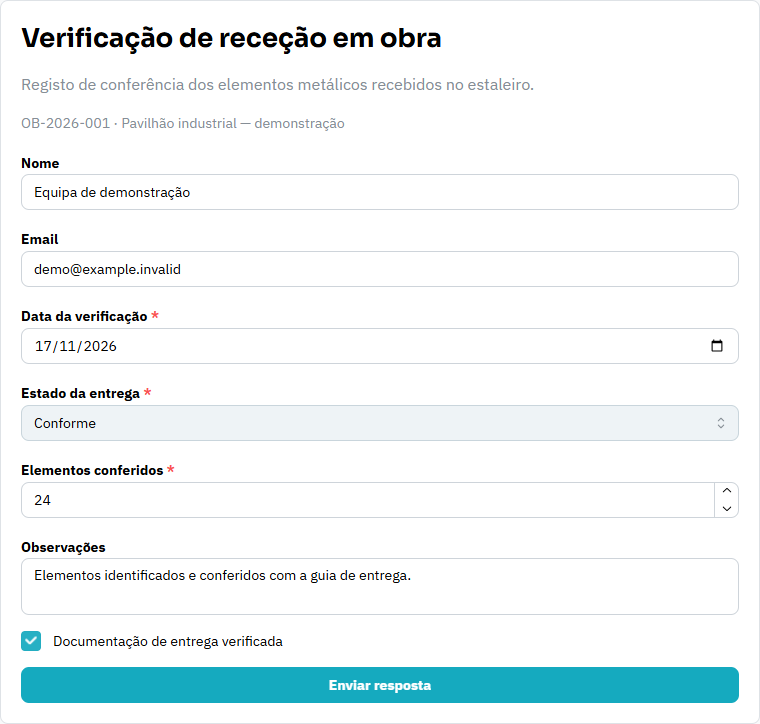
Configurable form: a site delivery verification example, ready to complete through an external link. Portuguese interface with demonstration data.
Email linked to processes
Configure personal and shared accounts.
Message templates with subject and body.
Send email through a configured account and record the outcome.
Link messages to product records.
Automatic message retrieval is under development and requires a dedicated connector.
Administration and customisation
Users, profiles and access permissions by area.
Two-factor authentication and restricted administrative access.
Work centres, operations, organisations and technical catalogue.
Configurable fields, tables, statuses and coding rules.
Calendars, languages and import settings.
No features found for this search.
A product evolving with the industry
Connecting companies is part of Lovoro's vision. Automatic synchronisation between installations and companies is being prepared and is not presented here as an available service.
The Pioneer Partners Program provides an opportunity to share needs and discuss the processes that matter to each organisation.